
This article explains how indexation works in OWNER: from the method in the rental contract to the new rent on the sales invoice. At the bottom you'll find all questions about indexations.
In this article
What is an indexation?
With an indexation, you increase the rent periodically, for example every year based on the CPI figure from CBS (Statistics Netherlands). You set this up once in the rental contract; after that, OWNER does most of the work for you.
- In the rental contract, you choose an indexation method and an indexation date.
- OWNER schedules the indexation and calculates the new rent as soon as the figure is known.
- OWNER automatically creates an indexation letter for the tenant.
- When the indexation is approved (automatically or by you), the sales items of the rental contract are updated. The old sales item gets an end date and a new sales item is added with the new rent.
- The next sales invoices automatically go out with the new rent, and the indexation date moves forward one year.
You can see all planned and completed indexations under Contracts > Indexations. In a rental contract, you can also see them on the right under Indexations.
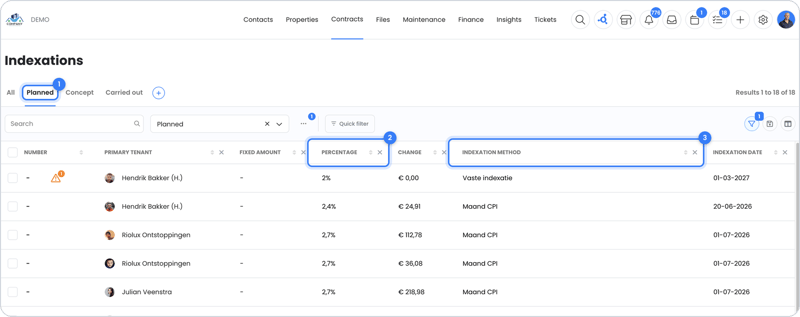
Which methods work automatically?
Whether OWNER calculates the new rent itself depends on the indexation method.
| Method | Country | How does it work? |
|---|---|---|
| Monthly CPI | Netherlands | Automatic: figures come directly from CBS |
| Annual average CPI | Netherlands | Automatic: figures come directly from CBS |
| Vrije sector, Middenhuur, Sociale huur (Dutch free-sector, mid-rent and social housing) | Netherlands | Not automatic yet: index manually for now |
| Methods per region | Belgium | According to the rules of the region |
| Fixed indexation or a custom method | All countries | A fixed percentage you set yourself |
Note: For Vrije sector, Middenhuur and Sociale huur, OWNER doesn't calculate automatically yet and doesn't yet take the Dutch points system (WWS) into account. For now, you index these rental contracts manually, by deviating from the scheduled indexation. Automatic calculation is on the roadmap.
You can read the full overview, and how to add a custom method, in Which indexation methods are there and how do you link them?
When does indexation happen?
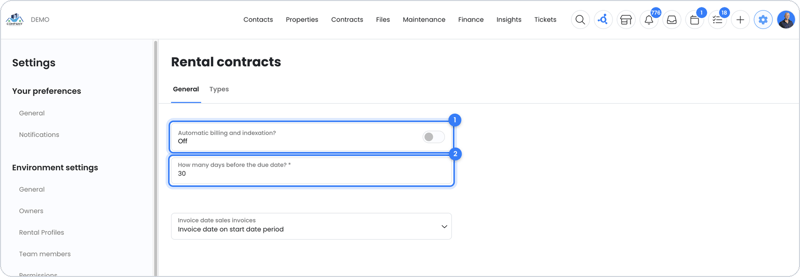
That depends on the Automatically bill and index? setting under Settings > Modules > Contracts > Rental contracts. This setting applies to all indexation methods at once.
| Setting | What happens? |
|---|---|
| On | Indexations are always planned, even if the figure isn't known yet. At the moment you set under How many days before the due date?, OWNER first applies the indexation and right after that sends the sales invoice with the new rent. There is no approval step. |
| Off | An indexation is only made ready once the figure is known. You then decide yourself when to approve the indexation and send the indexation letter. |
You can read more about sending sales invoices automatically in Automatic invoicing.
The indexation letter
- The text of the indexation letter is fixed and can't be changed. The letter does show the owner's logo and details. You set those under Settings > Environment settings > Owners.
- The letter is sent in the language set for the person who receives it. See In which language does someone receive documents?
- The letter has a QR code that links to an online page with the indexation.
All questions about indexations
Setup
- Which indexation methods are there and how do you link them?
- How do I index by the same percentage every year?
- How do I set a minimum or maximum indexation percentage?
- Which CPI series does OWNER use and why does the result sometimes differ?
Day-to-day work
Troubleshooting
Still need help?
Contact support:
- Chat: through the help center (chat button at the bottom right)
- Email: support@owner.app
- Call or WhatsApp: +31 591 799 602