
With bookings, you rent out a unit for the short term, for example as a vacation home or guest accommodation. Guests book a period with a fixed end date directly, and OWNER invoices once.
In this article
What are bookings?
A booking is a one-time checkout with a known start and end date. That's how a booking differs from a rental contract:
| Booking | Rental contract | |
|---|---|---|
| Duration | Fixed period with an end date | Long term |
| Sales invoices | Once, at the time of booking | Monthly, quarterly, semi-annually or annually |
| How is it created? | The guest books directly through your placement | You create it after a response to your placement |
You offer a unit for bookings with a short-term placement. Each unit can only have one placement at a time, so a unit is placed either for the long term or for bookings. See How to place a unit on OWNER.
Availability and booking calendar
For a short-term placement, the booking calendar automatically shows which periods are still available. A booked period can't be booked again.
How does the guest pay?
| Method | How does it work? | What do you need? |
|---|---|---|
| Pay directly (default) | The guest pays immediately when booking. | OWNER Pay (soon OWNER Wallet, expected late 2026). See Activating OWNER Pay. |
| On account | When the guest books, OWNER creates a sales invoice that remains open. If the guest doesn't pay on time, reminders follow according to your settings. | Always works. With an accounting integration, this is the only option; the guest then pays by bank transfer. |
Note: paying directly when booking only works with OWNER Pay. If you use an accounting integration, bookings are always on account.
You set up reminders under Settings > Modules > Financial > Sales invoices, under ‘Automatic reminders?’.
Viewing bookings
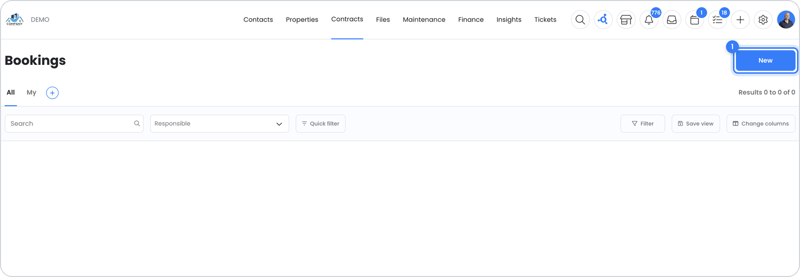
All your bookings are in the menu under Contracts > Bookings. Open a booking to see the period, the guest and the related sales invoice. You can also find the sales invoice under Financial > Sales invoices.
Canceling a booking
When a booking is canceled, OWNER doesn't automatically refund any money. You credit the booking's sales invoice yourself. See How do I create a credit invoice?.
| Sales invoice status | What happens after crediting? |
|---|---|
| Already paid | The amount is added as a balance for the guest (debtor). See Debtor balance. |
| Not paid yet | The sales invoice is reversed. The guest doesn't have to pay anything. |
With OWNER Wallet (expected late 2026), after crediting a paid sales invoice you can refund the money yourself or have it refunded automatically.
Frequently asked questions
Why can't my guest pay directly?
Paying directly only works if OWNER Pay is active. If you use an accounting integration, or OWNER Pay hasn't been activated yet, the booking is on account.
Can I offer a unit for both bookings and the long term?
Not at the same time. A unit has only one placement: either short term or long term.
Does the guest get reminders if they don't pay?
Yes, for a booking on account, if automatic reminders are turned on in the Sales invoices settings.
Still need help?
Contact support:
- Chat: via the help center (chat button in the bottom right)
- Email: support@owner.app
- Call or WhatsApp: +31 591 799 602