
You decide per rental contract or per sales invoice how a sales invoice is sent: not at all, by email or via Peppol. Here you can read what the options are and what the recipient receives.
In this article
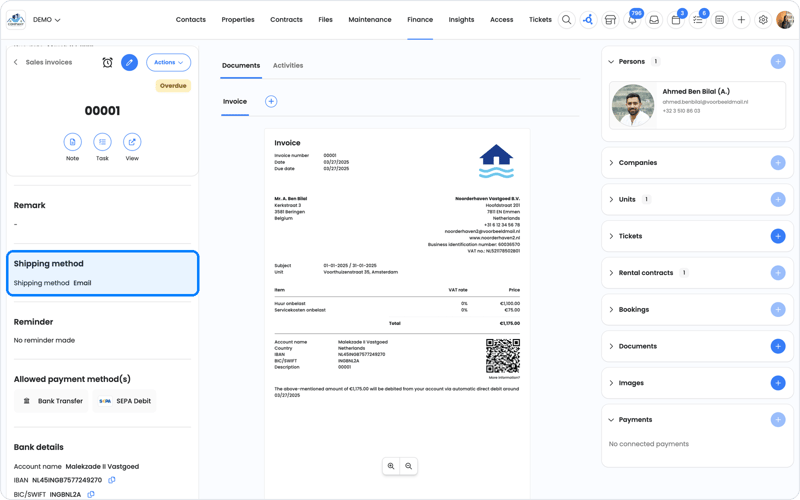
The sending methods
| Sending method | What happens? |
|---|---|
| Do not send | The sales invoice is created, but not sent. Useful if you want to forward it yourself or send it by post. No automatic reminders are sent in that case either. |
| Send by email | The recipient gets an email with a button to the sales invoice. There they can download the PDF and any attachments, without logging in. The PDF isn't attached to the email. |
| Send via Peppol | The sales invoice goes directly to the recipient's accounting package (XML and PDF). For this, you first connect the Peppol app. See Peppol. |
You choose the sending method on the rental contract (it then applies to all sales invoices of that contract) or on an individual sales invoice.
Does the recipient have no email address? Then you can't set them as the recipient. The sales invoice and the indexation letter are then set to Do not send. First enter an email address for the person.
Sending by post
OWNER doesn't send post. Want to send a sales invoice by post? Choose Do not send, download the PDF of the sales invoice and send it yourself.
What does the recipient receive?
- Every sales invoice has a QR code. It leads to the sales invoice's online page, where the recipient can view it.
- The sales invoice is in the language set for the receiving person, not in your own language. Read more in In which language does someone receive a sales invoice?
- The sales invoice goes to one email address. Sending to multiple email addresses or in cc isn't possible yet.
Frequently asked questions
I can't send my sales invoice. Why is that?
To send sales invoices, your environment must be activated. If you use OWNER Pay, the verification must also be completed. Read more in Can I start with OWNER for free, and when do I need to activate my environment?
Can the sales invoice go to several tenants?
See Which email address does the sales invoice go to, and can it go to several?
Can I send a sales invoice again?
Yes, via Actions > Send again on the sales invoice. A sales invoice can be sent multiple times; the content and invoice date stay the same. OWNER records when the sales invoice was sent.
Does a sales invoice with the sending method Do not send still go to my accounting?
Yes, as soon as you approve it and it's final. Only the tenant doesn't receive anything. A sales invoice goes from Planned to Concept to final. Only final sales invoices are exchanged with your accounting integration.
Can I receive a copy of every sales invoice myself?
Yes. Enter a BCC address with the owner on the Sales invoices tab. You'll then receive a copy of every sales invoice you send.
Where does my tenant find the PDF?
The email contains a button to the sales invoice. There the tenant can download the PDF, without logging in. So the PDF isn't attached to the email. Does the tenant see nothing? Then ask them to check their spam folder, or send the sales invoice again via Actions > Send again.
Can I send an attachment with a sales invoice?
Yes. Add the document to the sales invoice before you send it. The attachment then appears as a download button in the email, not as a separate attachment. Does your customer use an invoice mailbox that only processes attachments? Then send the attachment separately or use Peppol.
Can I send sales invoices from my own email address?
Yes, you turn that on yourself. Go to Settings > Environment settings > Owners and open the owner. On the Sales invoices tab (and Indexations if needed), turn on Different sender and enter the name and email address. That address then appears as the sender at the top of the email and on the sales invoice. If a tenant replies to the email, their reply arrives at that email address (reply-to). You don't need to change any DNS settings, such as SPF or DKIM, for this. Without this setting, emails are sent from noreply@owner.app.
Why does it say "Available after sending" next to the payment details?
The payment details, such as the account number the tenant pays to, are only created when you send the sales invoice. That's why a preview, or a PDF you download before sending, says "Available after sending". That's normal. Download the PDF again after you've sent the sales invoice. Does the text still appear after that? Then contact support.
Why is there no payment button on the sales invoice?
The payment button only appears if iDEAL is turned on as a payment option on the rental contract. Open the rental contract, check iDEAL and save. New sales invoices will then get a payment link again. Also check whether OWNER Pay has been activated for the owner. Read How do I activate OWNER Pay?.
Still need help?
Contact support:
- Chat: through the help center (chat button at the bottom right)
- Email: support@owner.app
- Call or WhatsApp: +31 591 799 602