
You decide per rental contract or per sales invoice how a sales invoice is sent: not at all, by email or via Peppol. Here you can read what the options are and what the recipient receives.
In this article
The sending methods
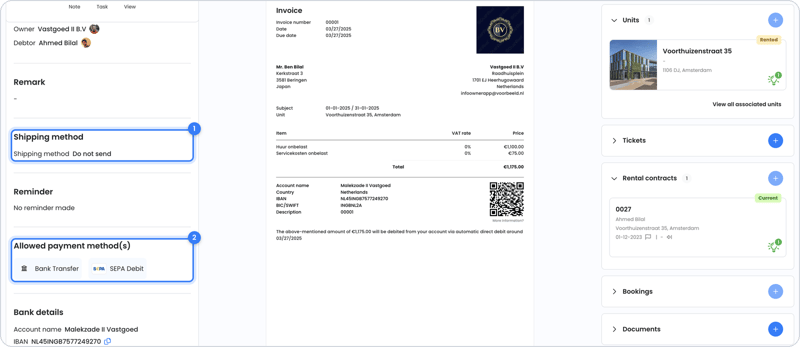
| Sending method | What happens? |
|---|---|
| Do not send | The sales invoice is created, but not sent. Useful if you want to forward it yourself or send it by post. No automatic reminders are sent in that case either. |
| Send by email | The recipient gets an email with the sales invoice as a PDF and a button to the online page. |
| Send via Peppol | The sales invoice goes directly to the recipient's accounting package (XML and PDF). For this, you first connect the Peppol app. See Peppol. |
You choose the sending method on the rental contract (it then applies to all sales invoices of that contract) or on an individual sales invoice.
Sending by post
OWNER doesn't send post. Want to send a sales invoice by post? Choose Do not send, download the PDF of the sales invoice and send it yourself.
What does the recipient receive?
- Every sales invoice has a QR code. It leads to the sales invoice's online page, where the recipient can view it.
- The sales invoice is in the language set for the receiving person, not in your own language. Read more in In which language does someone receive a sales invoice?
- The sales invoice goes to one email address. Sending to multiple email addresses or in cc isn't possible yet.
Frequently asked questions
I can't send my sales invoice. Why is that?
To send sales invoices, your environment must be activated. If you use OWNER Pay, the verification must also be completed. Read more in Can I start with OWNER for free, and when do I need to activate my environment?
Can the sales invoice go to several tenants?
See Which email address does the sales invoice go to, and can it go to several?
Can I send a sales invoice again?
Yes, via Actions > Send again on the sales invoice. A sales invoice can be sent multiple times; the content and invoice date stay the same. OWNER records when the sales invoice was sent.
Still need help?
Contact support:
- Chat: through the help center (chat button at the bottom right)
- Email: support@owner.app
- Call or WhatsApp: +31 591 799 602