
With a placement, you list a unit publicly on the OWNER platform. Searchers find your listings, can respond or book directly, and you manage everything from my.owner.app.
In this article
What is a placement?
A placement is the public listing of a unit on the front end of OWNER (owner.app), similar to an ad. You always create a placement based on a unit that's already in OWNER, and add a title, description, photos, amenities, price and availability.
There are two kinds of placements:
| Long term (rental) | Short term (bookings) | |
|---|---|---|
| What is it? | Rental for an indefinite or longer period. Eventually becomes a rental contract. | A one-time booking with a fixed start and end date, like a vacation home. |
| Availability | You indicate from when the unit is available. | The booking calendar automatically shows which periods are free. |
| How does someone respond? | Via the contact form on the placement. | By booking directly. |
| Sales invoices | Via the rental contract: per month, quarter, half-year or year. | One sales invoice per booking. |
| Read more | Responding to a placement | Bookings |
Note: each unit can only have one placement at a time: either long term or short term.
Where do you find your placements?
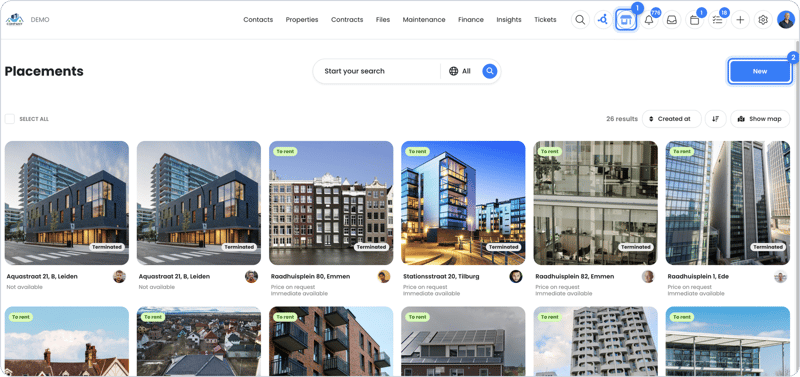
You open your placements via the house icon at the top of my.owner.app. There you see all your placements together and create new placements. You can also open a unit and add a placement there.
How it works
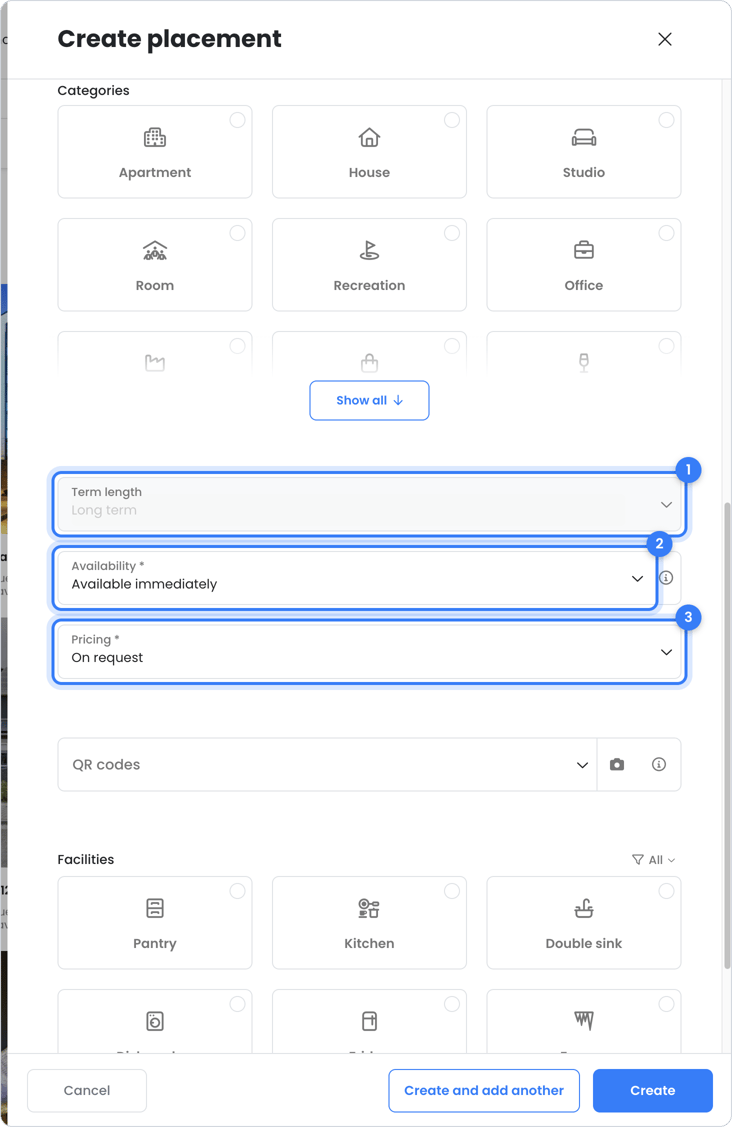
- Create a placement and choose the unit and the kind (long or short term).
- Fill in the title, description, photos, amenities, price and availability.
- Click Create. The placement is then visible on owner.app, on your rental profile and via your website widget.
- Handle responses in your inbox and tickets, or view bookings under Contracts > Bookings.
Read the steps in detail in How to place a unit on OWNER.
How your listings get found
- Saved searches: searchers with a saved search automatically get a notification when your placement matches their wishes.
- Followers: visitors can follow your rental profile and get notified of new listings.
- Unavailable properties: you can also place units that are currently rented. Visitors then request a notification for as soon as the property becomes available.
- Rental profile and website widget: your public page with its own subdomain, and a widget to show your placements on your own website. See Rental profiles and website widgets.
- Posters and signs: with a QR code on your property. See How to make a placement stand out.
Frequently asked questions
Can I offer a unit for long and short term at the same time?
No. A unit has only one placement at a time. Want to switch? Adjust the placement or create a new one.
Does OWNER automatically create a rental contract when someone responds?
No. A response comes in as a ticket. Once you reach an agreement, you create the rental contract yourself. See What happens when someone responds to my placement?.
Is OWNER the landlord of my unit?
No. OWNER is the platform. You (or your property manager) remain the landlord and make the agreements with the tenant.
Still need help?
Contact support:
- Chat: via the help center (chat button at the bottom right)
- Email: support@owner.app
- Call or WhatsApp: +31 591 799 602