
OWNER can automatically remind tenants about sales invoices that are still open after the due date. You turn this on or off for all sales invoices, and you can decide it per tenant or per sales invoice.
In this article
How do the reminders work?
You set up the reminders under Settings > Modules > Financial > Sales invoices, General tab.
| Field | What do you set? |
|---|---|
| Automatic reminders? | On or off for all new sales invoices. |
| First reminder | Number of days after the due date. |
| Second reminder | Number of days after the first reminder. |
| Send third reminder | Optional: number of days after the second reminder. |
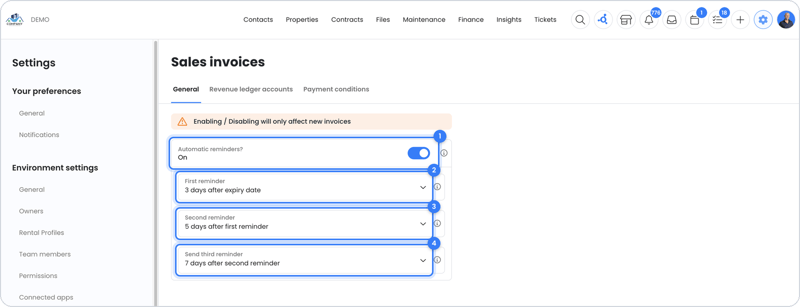
Note: turning this on or off only affects new sales invoices. Existing sales invoices keep their own setting. Formal demand letters and debt collection are not part of OWNER.
For one tenant
Select the tenant (or several tenants at once) in the overview and click the alarm clock with a cross through it at the bottom. This turns off automatic reminders for that tenant.
For one sales invoice
Open the sales invoice and under Actions choose Disable automatic reminder. Whether reminders are on is shown on the left under Reminder. This way you can also still turn on automatic reminders for older sales invoices.
Frequently asked questions
Why does a tenant still get a reminder?
- Sales invoices created while automatic reminders were on keep reminders turned on. Turn them off per sales invoice via Actions.
- A tenant who no longer rents only gets a reminder if the open sales invoice has automatic reminders turned on.
- Payment was made, but hasn't been processed yet. See Why does my tenant get a reminder even though they paid?
Can I see which reminders were sent?
Yes, the reminder is visible on the Activities tab of the sales invoice. If an email address is set for the owner (Sales invoice tab, E-mail BCC field), you also receive a copy by email.
Are reminders sent if the sending method is set to do not send?
No. You can still send a reminder yourself; see How do I manually send a reminder?
Still need help?
Contact support:
- Chat: through the help center (chat button at the bottom right)
- Email: support@owner.app
- Call or WhatsApp: +31 591 799 602