
A unit is a single property you manage or rent out, such as a house, apartment, store, office or parking space. Units form the basis of your real estate in OWNER.
In this article
What do you record for a unit?
For a unit, you record the characteristics of the property, such as the category, area, location and owner. Each unit belongs to one owner: the party on whose behalf the sales invoices are sent.
You can also link the following to a unit, among other things:
| Part | What for |
|---|---|
| Rental contracts | Who rents the unit and what is invoiced. |
| Values | Market value, appraisal value or other valuations, so you can track how they develop over time. |
| Energy labels | Label, issue date and valid until. |
| Installations | For example an elevator or boiler, with the related service contracts. |
| Placements | The public listing of the unit on the OWNER platform, for long term (rental) or short term (bookings). |
Grouping units in a project
A project is a group of units, for example an apartment complex or shopping center. It's not a separate level: you record values and other characteristics per unit. You manage projects under Settings > Modules > Properties > Units. Read more in What is the difference between a project and a unit?.
Creating a unit
Step 1 – Open units
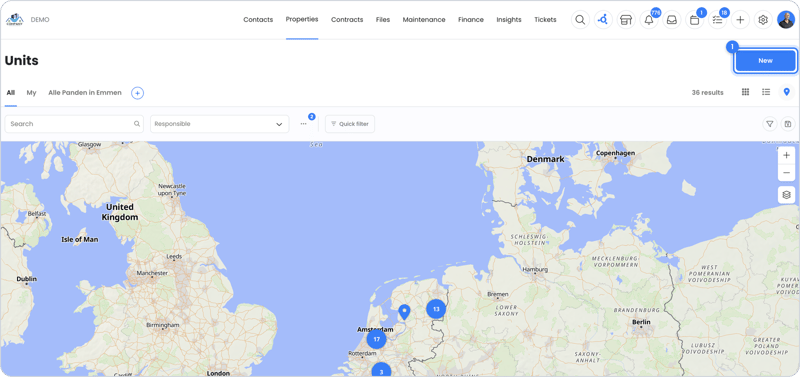
- Go to Properties > Units and click New.
Step 2 – Fill in the details
- Choose the owner and fill in the address and characteristics.
- Link the unit to a project if needed.
- Save the unit. You can then create a rental contract right away.
Tip: Renting out one building to multiple tenants? Then create a unit for each separately rentable space and group them in a project.
Credits, archiving and deleting
Your subscription charges credits per unit that isn't archived. Read more in Subscription and credits.
Selling a unit or no longer managing it? Then you can delete or archive it. Read which option is possible when in How do I delete or archive a unit?.
Still need help?
Contact support:
- Chat: via the help center (chat button at the bottom right)
- Email: support@owner.app
- Call or WhatsApp: +31 591 799 602