
Two-factor authentication gives your OWNER account extra security. In addition to your password, you then enter a code from an authenticator app on your phone.
Turning on two-factor authentication
- Install an authenticator app on your phone, for example Google Authenticator.
- In OWNER, click your profile picture at the top right and choose Account.
- Open Login and security.
- At the bottom of the page, choose to turn on two-factor authentication, enter your password and confirm.
- A QR code appears. Open your authenticator app, tap + and scan the QR code (or enter the key manually).
- Enter the code from the app to finish.
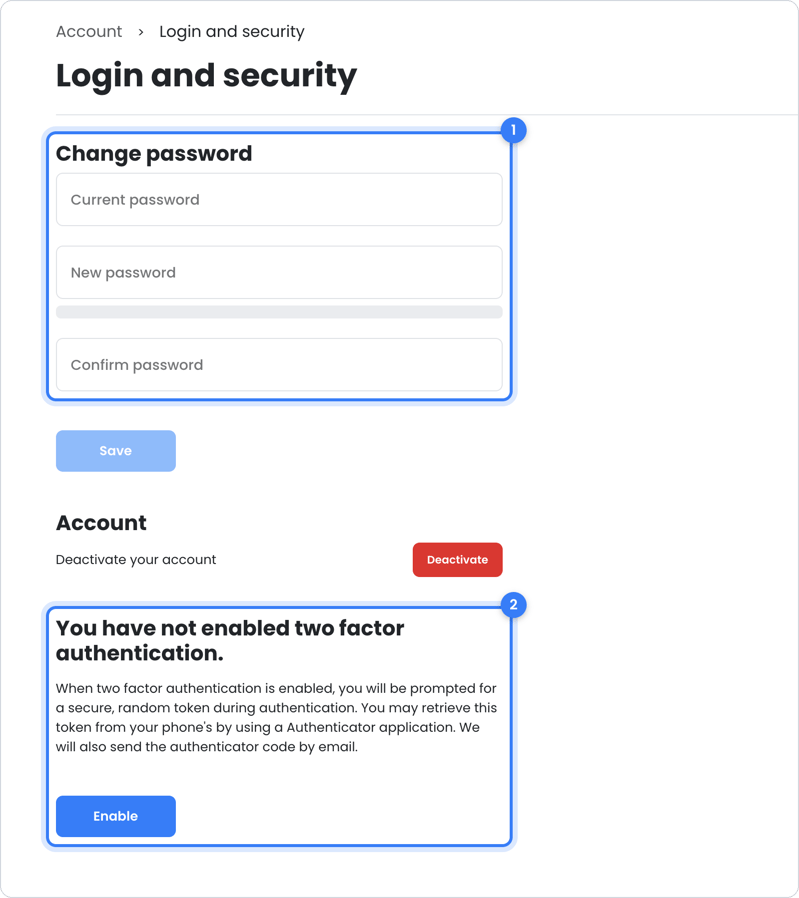
From now on, OWNER also asks for a code from the app when you log in.
Want to change your password? Read How can I change my password?.
Still need help?
Contact support:
- Chat: through the help center (chat button at the bottom right)
- Email: support@owner.app
- Call or WhatsApp: +31 591 799 602