
For every rental contract, OWNER keeps track of the date up to which it has been invoiced: Invoiced until. The next sales invoice starts the day after. You can change this date yourself.
In this article
When do you change this?
- A sales invoice was deleted or was incorrect, and you want to invoice the same period again.
- An empty sales invoice was deleted automatically (for example because no sales items were active anymore), which moved the date forward.
- You have already invoiced in another system and want OWNER to start invoicing from a later period.
How to change the date
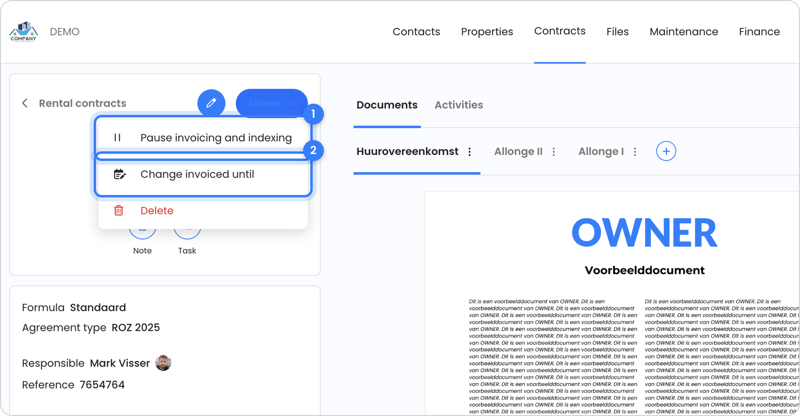
- Open the rental contract.
- Click Actions.
- Choose Change invoiced until.
- Set the date to the end date of the last correct sales invoice.
The sales invoice for the next period then appears again under Financial > Sales invoices > Planned.
Note: if you set the date far back, OWNER also creates sales invoices again for periods you have already sent. Only send the sales invoice you need, and then set Invoiced until back to the last period you sent.
Prefer to do it manually?
You can also create the sales invoice yourself. See How do I create a manual sales invoice? An invoice date in the past isn't possible; see Invoice date and invoice number.
Still need help?
Contact support:
- Chat: through the help center (chat button at the bottom right)
- Email: support@owner.app
- Call or WhatsApp: +31 591 799 602