
You change your password yourself in your account, under Login and security.
In this article
How to change your password
- Click your profile picture in the top right and choose Account.
- Open Login and security.
- Enter your current password and then your new password twice.
- Save the change.
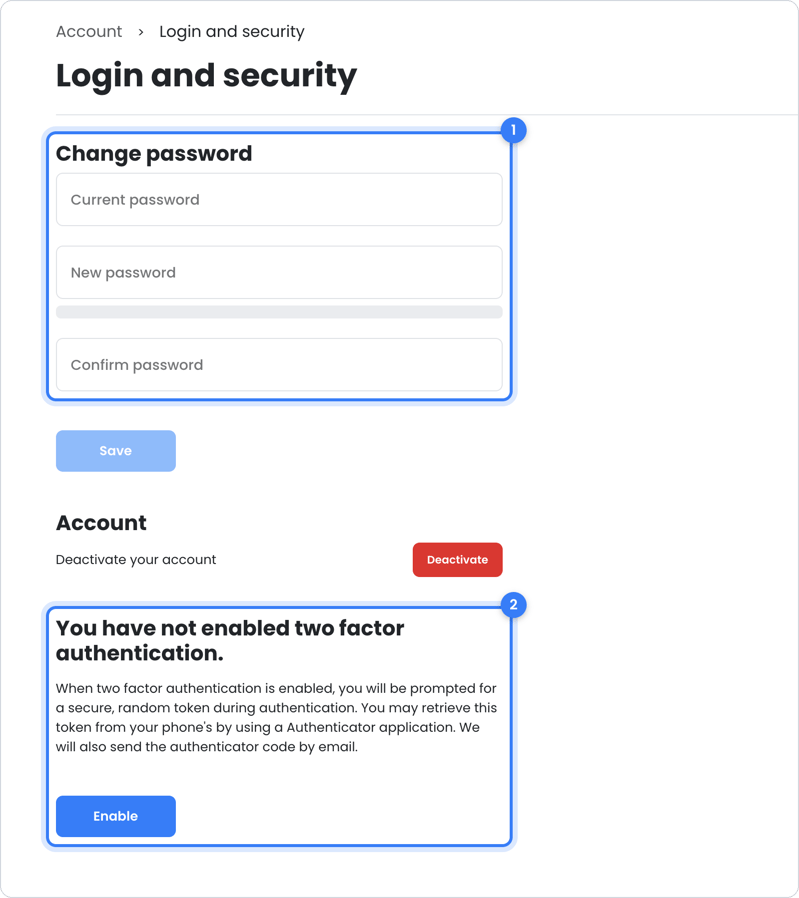
Tip: choose a password you don't use anywhere else. Under Login and security, you can also turn on two-step verification.
Frequently asked questions
I log in with Google
Then you use your Google password. You change it in your Google account.
Still need help?
Question about your rental, your rental contract or a sales invoice? Contact your landlord. Your landlord manages your rental and decides what you see in OWNER.
Question about your OWNER account? Contact OWNER support:
- Chat: via the help center – choose ‘I am a tenant’ and use the chat button in the bottom right
- Email: support@owner.app
- Call or WhatsApp: +31 591 799 602