
You set up the invoice numbering of your sales invoices per owner. You choose whether the number includes the year, whether you want a fixed prefix and which number you start with.
How to set up invoice numbering
- Go to Settings > Environment settings > Owners.
- Click the owner.
- Open the Sales invoice tab.
- Choose your settings (see below) and save.
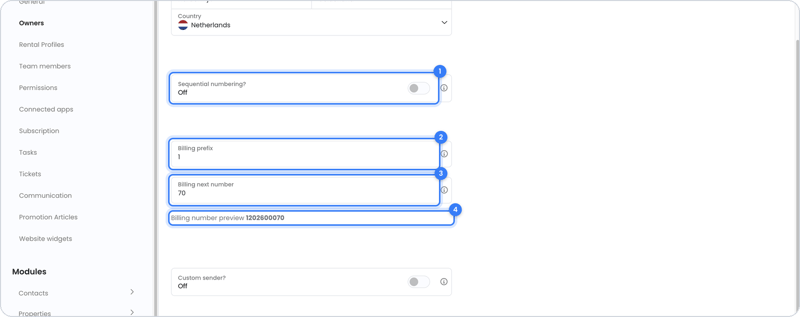
What can you set up?
| Setting | What does it do? | Example |
|---|---|---|
| Sequential numbering? off | The year comes before the number. | 202600001 |
| Sequential numbering? on | No year; the numbers keep counting up. | 00001 |
| Billing prefix | A fixed number at the very front of the invoice number, whether sequential numbering is on or off. | Prefix 1 + 2026 + 00070 = 1202600070 |
| Billing next number | The number the next sales invoice starts with. By default this is 1. | Start at 100 |
| Billing number preview | Shows what the next invoice number looks like with your settings. | 1202600070 |
Tip: switching from another system? Set Billing next number to the number after your last sent sales invoice, so your numbering continues neatly.
Frequently asked questions
Why per owner?
Sales invoices are sent on behalf of the owner: the company or private individual who rents out the property. That's why each owner has their own number series.
When does a sales invoice get a number?
As soon as it becomes final. Planned sales invoices and drafts don't have a final invoice number yet.
More about invoice date and invoice number
Read Invoice date and invoice number: what can and can't you do?
Still need help?
Contact support:
- Chat: through the help center (chat button at the bottom right)
- Email: support@owner.app
- Call or WhatsApp: +31 591 799 602