---
title: Sales invoices
description: "How the Sales invoices module works in OWNER: Planned, Concept, Open, Overdue and Paid tabs, sending, reminders and crediting."
---
[Skip to content](https://knowledge.owner.app/en/sales-invoices#main-content)
- [English](https://knowledge.owner.app/en/sales-invoices)
- [Deutsch](https://knowledge.owner.app/de/ausgangsrechnungen)
- [Español](https://knowledge.owner.app/es/facturas-de-venta)
- [Français](https://knowledge.owner.app/fr/factures-de-vente)
- [Nederlands](https://knowledge.owner.app/nl/verkoopfacturen)
English
Show submenu for translations
[More support](https://knowledge.owner.app/en/kb-tickets/new?hsLang=en)
[](https://knowledge.owner.app/en/?hsLang=en)
Open main navigation
Close main navigation
- - [English](https://knowledge.owner.app/en/sales-invoices)
- [Deutsch](https://knowledge.owner.app/de/ausgangsrechnungen)
- [Español](https://knowledge.owner.app/es/facturas-de-venta)
- [Français](https://knowledge.owner.app/fr/factures-de-vente)
- [Nederlands](https://knowledge.owner.app/nl/verkoopfacturen)
English
Show submenu for translations
- [More support](https://knowledge.owner.app/en/kb-tickets/new)
- [Back to environment](http://my.owner.app/)
[Back to environment](http://my.owner.app/)
Knowledge bank for owners
- There are no suggestions because the search field is empty.
1. [Knowledge base](https://knowledge.owner.app/en?hsLang=en)
2. [Working with OWNER](https://knowledge.owner.app/en/working-with-owner?hsLang=en)
October 20, 2026
# Sales invoices
## Everything about the Sales invoices module: tabs, how a sales invoice is created, sending, reminders and crediting.
In the Sales invoices module, you create, send and track all sales invoices of your owners. You can find the module under **Financial** \> **Sales invoices**.
**In this article**
1. [The overview and the tabs](https://knowledge.owner.app/en/sales-invoices#het-overzicht)
2. [How is a sales invoice created?](https://knowledge.owner.app/en/sales-invoices#hoe-ontstaat-een-verkoopfactuur)
3. [From planned to paid](https://knowledge.owner.app/en/sales-invoices#van-gepland-tot-betaald)
4. [Sending](https://knowledge.owner.app/en/sales-invoices#versturen)
5. [Reminders and crediting](https://knowledge.owner.app/en/sales-invoices#herinneren-en-crediteren)
6. [Processing payments](https://knowledge.owner.app/en/sales-invoices#betalingen)
7. [Frequently asked questions](https://knowledge.owner.app/en/sales-invoices#veelgestelde-vragen)
- [Setup and numbering](https://knowledge.owner.app/en/sales-invoices#faq-instellen)
- [Creating, sending and correcting](https://knowledge.owner.app/en/sales-invoices#faq-maken)
- [Reminders](https://knowledge.owner.app/en/sales-invoices#faq-herinneringen)
## The overview and the tabs
Go to **Financial** \> **Sales invoices**. At the top, you'll see tabs that show the sales invoices by status. With the **New** button you create a sales invoice yourself.

The tabs show your sales invoices by status.
| Tab | What do you see here? |
| --- | --- |
| **All** | All sales invoices, regardless of status. |
| **Planned** | Sales invoices that OWNER has prepared from your rental contracts for the next period, with the sending date. If automatic invoicing is on, they go out automatically on that date. If it's off, you accept them yourself. |
| **Concept** | Draft sales invoices that you have accepted or created yourself, but that are not final yet. You can still edit them. |
| **Open** | Final sales invoices that have not been paid yet and whose due date has not passed yet. |
| **Overdue** | Final sales invoices that are still unpaid after the due date. Reminders can be sent for these. |
| **Paid** | Sales invoices that have been paid in full. |
## How is a sales invoice created?
| How | What happens? |
| --- | --- |
| **Automatically from a rental contract** | You link [sales items](https://knowledge.owner.app/en/sales-items?hsLang=en) to a rental contract. Based on those, OWNER prepares a sales invoice for each period under **Planned**. See [How does automatic invoicing work?](https://knowledge.owner.app/en/automatic-invoicing?hsLang=en) |
| **Manual** | With **New** you create a sales invoice yourself, for example for a correction or one-time costs. See [How do I create a manual sales invoice?](https://knowledge.owner.app/en/manual-sales-invoice?hsLang=en) |
| **From a booking** | If paying ‘on account’ is turned on for short-term rentals, OWNER creates an open sales invoice when the booking is made. |
| **As a credit invoice** | A credit invoice is a sales invoice with a negative amount. See [How do I create a credit invoice?](https://knowledge.owner.app/en/create-credit-invoice?hsLang=en) |
| **As a management invoice** | If you're a property manager, you invoice your management fee from your manager environment. See [How do management invoices work?](https://knowledge.owner.app/en/management-invoices?hsLang=en) |
## From planned to paid
1. **Planned** – OWNER prepares the sales invoice from the rental contract.
2. **Concept** – you accept the planned sales invoice (or create one yourself). You can still edit it.
3. **Open** – you accept the draft. The sales invoice is now final, gets an invoice number and is sent through the chosen sending method.
4. **Overdue** or **Paid** – depending on whether it was paid on time.
If [automatic invoicing](https://knowledge.owner.app/en/automatic-invoicing?hsLang=en) is on, OWNER goes through these steps by itself on the sending date.
**Tip:** before your first send, always take a quick look at the **Planned** tab. Also go through the [checklist for your first sales invoices](https://knowledge.owner.app/en/getting-started?hsLang=en).
## Sending
For each sales invoice (or each rental contract), you choose the sending method: don't send, by email or via Peppol. The sales invoice goes to one recipient, in the language set for that person. Every sales invoice has a QR code that links to the sales invoice's online page.
Read more in [How do I send a sales invoice?](https://knowledge.owner.app/en/send-sales-invoice?hsLang=en)
## Reminders and crediting
OWNER can automatically send a first, second and third reminder if a sales invoice is still open after the due date. You set this up under **Settings** \> **Modules** \> **Financial** \> **Sales invoices** \> **General**. Formal demand letters and debt collection are not part of OWNER.
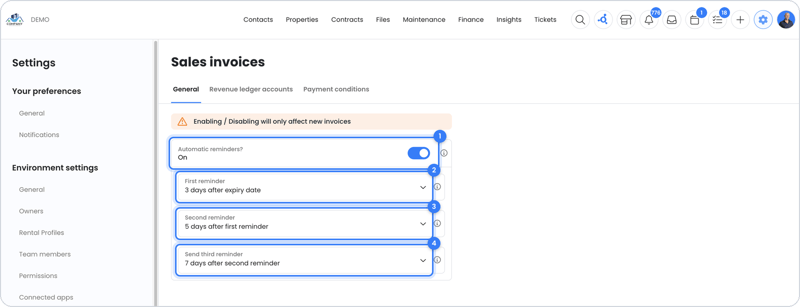
This is where you set up the first, second and third reminder.
You credit an incorrect sales invoice via **Actions** on the sales invoice.
## Processing payments
Payments come in through OWNER Pay (soon OWNER Wallet, expected late 2026), or you process them in your connected accounting package. With an accounting integration, the payment status in your accounting package is leading. Read more in [OWNER Wallet or accounting integration: how do you process payments?](https://knowledge.owner.app/en/owner-wallet-or-accounting-integration?hsLang=en)
## Frequently asked questions
### Setup and numbering
- [How does automatic invoicing work?](https://knowledge.owner.app/en/automatic-invoicing?hsLang=en)
- [Which period does OWNER invoice for?](https://knowledge.owner.app/en/invoicing-periods?hsLang=en)
- [How do I set up invoice numbering?](https://knowledge.owner.app/en/invoice-numbering?hsLang=en)
- [Invoice date and invoice number: what can and can't you do?](https://knowledge.owner.app/en/invoice-date-and-number?hsLang=en)
- [Can I add a reference number or VAT number to the sales invoice?](https://knowledge.owner.app/en/reference-or-vat-number-on-invoice?hsLang=en)
[↑ Back to the questions](https://knowledge.owner.app/en/sales-invoices#veelgestelde-vragen)
### Creating, sending and correcting
- [How do I send a sales invoice?](https://knowledge.owner.app/en/send-sales-invoice?hsLang=en)
- [Which email address does the sales invoice go to, and can it go to several?](https://knowledge.owner.app/en/sales-invoice-recipients?hsLang=en)
- [How do I create a manual sales invoice?](https://knowledge.owner.app/en/manual-sales-invoice?hsLang=en)
- [How do I create a credit invoice?](https://knowledge.owner.app/en/create-credit-invoice?hsLang=en)
- [Why isn't my sales invoice ready?](https://knowledge.owner.app/en/sales-invoice-not-ready?hsLang=en)
- [What is ‘Invoiced until’ and how do I change it?](https://knowledge.owner.app/en/invoiced-until?hsLang=en)
- [How do management invoices work?](https://knowledge.owner.app/en/management-invoices?hsLang=en)
[↑ Back to the questions](https://knowledge.owner.app/en/sales-invoices#veelgestelde-vragen)
### Reminders
- [How do I turn automatic reminders on or off?](https://knowledge.owner.app/en/automatic-reminders-per-tenant-or-invoice?hsLang=en)
- [How do I manually send a reminder?](https://knowledge.owner.app/en/send-reminder-manually?hsLang=en)
- [Why does my tenant get a reminder even though they paid?](https://knowledge.owner.app/en/reminder-after-payment?hsLang=en)
[↑ Back to the questions](https://knowledge.owner.app/en/sales-invoices#veelgestelde-vragen)
## Still need help?
Contact support:
- **Chat:** through the [help center](https://owner.app/help?hsLang=en) (chat button at the bottom right)
- **Email:** [support@owner.app](mailto:support@owner.app)
- **Call or WhatsApp:** [+31 591 799 602](tel:+31591799602)
- [Working with OWNER](https://knowledge.owner.app/en/working-with-owner?hsLang=en)
- [Frequently Asked Questions](https://knowledge.owner.app/en/frequently-asked-questions?hsLang=en)
- [Tips](https://knowledge.owner.app/en/tips?hsLang=en)
- [Connections](https://knowledge.owner.app/en/connections?hsLang=en)
[](https://knowledge.owner.app/nl?hsLang=en)
Raadhuisplein 82, 7811 AP Emmen, Nederland
[mailto:support@owner.app](mailto:support@owner.app)
Copyright © 2025, OWNER