---
title: How do I pause billing and indexation for a rental contract?
description: Pause a rental contract to temporarily stop generating and sending sales invoices and indexations. Here’s how to resume it later.
---
[Skip to content](https://knowledge.owner.app/en/pause-billing-and-indexation#main-content)
- [English](https://knowledge.owner.app/en/pause-billing-and-indexation)
- [Deutsch](https://knowledge.owner.app/de/abrechnung-und-indexierung-pausieren)
- [Español](https://knowledge.owner.app/es/pausar-facturacion-e-indexacion)
- [Français](https://knowledge.owner.app/fr/suspendre-facturation-et-indexation)
- [Nederlands](https://knowledge.owner.app/nl/facturatie-en-indexatie-pauzeren)
English
Show submenu for translations
[More support](https://knowledge.owner.app/en/kb-tickets/new?hsLang=en)
[](https://knowledge.owner.app/en/?hsLang=en)
Open main navigation
Close main navigation
- - [English](https://knowledge.owner.app/en/pause-billing-and-indexation)
- [Deutsch](https://knowledge.owner.app/de/abrechnung-und-indexierung-pausieren)
- [Español](https://knowledge.owner.app/es/pausar-facturacion-e-indexacion)
- [Français](https://knowledge.owner.app/fr/suspendre-facturation-et-indexation)
- [Nederlands](https://knowledge.owner.app/nl/facturatie-en-indexatie-pauzeren)
English
Show submenu for translations
- [More support](https://knowledge.owner.app/en/kb-tickets/new)
- [Back to environment](http://my.owner.app/)
[Back to environment](http://my.owner.app/)
Knowledge bank for owners
- There are no suggestions because the search field is empty.
1. [Knowledge base](https://knowledge.owner.app/en?hsLang=en)
2. [Frequently Asked Questions](https://knowledge.owner.app/en/frequently-asked-questions?hsLang=en)
October 20, 2026
# How do I pause billing and indexation for a rental contract?
## Temporarily put automatic sales invoices and indexations on hold and resume them later.
Want to temporarily stop sales invoices and indexations for a rental contract, for example because you’re working out an arrangement with the tenant? Pause invoicing and indexing. The rental contract itself stays in place.
**In this article**
1. [What happens when you pause?](https://knowledge.owner.app/en/pause-billing-and-indexation#wat-doet-pauzeren)
2. [Pausing one rental contract](https://knowledge.owner.app/en/pause-billing-and-indexation#pauzeren)
3. [Multiple rental contracts at once](https://knowledge.owner.app/en/pause-billing-and-indexation#meerdere)
4. [Frequently asked questions](https://knowledge.owner.app/en/pause-billing-and-indexation#veelgestelde-vragen)
## What happens when you pause?
| | Paused | After resuming |
| --- | --- | --- |
| Sales invoices | Are no longer generated and sent. | Are generated and sent automatically again. |
| Indexations | Are no longer generated and sent. | Are generated and sent automatically again. |
| Rental contract | Stays active; all data is kept. | Unchanged. |
Paused rental contracts show up on the [Today screen](https://knowledge.owner.app/en/today-screen?hsLang=en) under the points of attention (**Rental contract – Paused**).
## Pausing one rental contract
### Step 1 – Open the rental contract
1. Go to **Contracts \> Rental contracts** and open the rental contract.
### Step 2 – Pause
1. Click **Actions** at the top left and choose **Pause invoicing and indexing**.
2. Confirm with **Pause**.
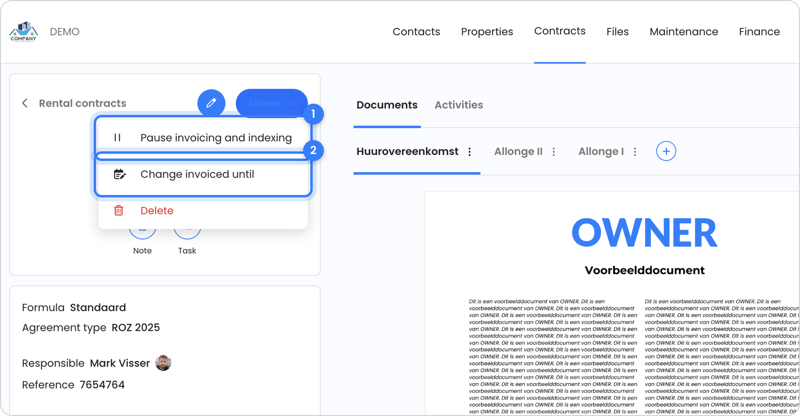
Choose Pause invoicing and indexing (1) in the Actions menu.
To resume, go to the same place and choose **Resume invoicing and indexing**.
## Multiple rental contracts at once
In the list of rental contracts, check the contracts and choose the pause icon (**Pause invoicing and indexing**) or the play icon (**Resume invoicing and indexing**) at the bottom. Read more in [How do you work with lists in OWNER?](https://knowledge.owner.app/en/working-with-lists?hsLang=en)
**Note:** after resuming, check the planned sales invoices and indexations of the rental contract. If the period isn’t right, see [Invoiced until](https://knowledge.owner.app/en/invoiced-until?hsLang=en).
## Frequently asked questions
#### What’s the difference with ending the rental contract?
Pausing is temporary: the rental contract simply continues. If the tenancy is really ending, enter an end date on the rental contract.
#### Do reminders for outstanding sales invoices continue?
Pausing stops creating and sending new sales invoices and indexations. You manage reminders for existing sales invoices per sales invoice. See [How do I turn automatic reminders on or off for a tenant or sales invoice?](https://knowledge.owner.app/en/automatic-reminders-per-tenant-or-invoice?hsLang=en)
#### I only want to stop indexing, but keep invoicing. Is that possible?
Yes. Turn off **Indexing?** on the rental contract instead of pausing. Read more in [Indexations](https://knowledge.owner.app/en/indexations?hsLang=en).
## Still need help?
Contact support:
- **Chat:** through the [help center](https://owner.app/help?hsLang=en) (chat button at the bottom right)
- **Email:** [support@owner.app](mailto:support@owner.app)
- **Call or WhatsApp:** [+31 591 799 602](tel:+31591799602)
- [Working with OWNER](https://knowledge.owner.app/en/working-with-owner?hsLang=en)
- [Frequently Asked Questions](https://knowledge.owner.app/en/frequently-asked-questions?hsLang=en)
- [Tips](https://knowledge.owner.app/en/tips?hsLang=en)
- [Connections](https://knowledge.owner.app/en/connections?hsLang=en)
[](https://knowledge.owner.app/nl?hsLang=en)
Raadhuisplein 82, 7811 AP Emmen, Nederland
[mailto:support@owner.app](mailto:support@owner.app)
Copyright © 2025, OWNER