---
title: How does OWNER work?
description: "How OWNER works: placements on the front end, property management in my.owner.app, one account, environments, the menu and payments."
---
[Skip to content](https://knowledge.owner.app/en/how-does-owner-work#main-content)
- [English](https://knowledge.owner.app/en/how-does-owner-work)
- [Deutsch](https://knowledge.owner.app/de/wie-funktioniert-owner)
- [Español](https://knowledge.owner.app/es/como-funciona-owner)
- [Français](https://knowledge.owner.app/fr/comment-fonctionne-owner)
- [Nederlands](https://knowledge.owner.app/nl/hoe-werkt-owner)
English
Show submenu for translations
[More support](https://knowledge.owner.app/en/kb-tickets/new?hsLang=en)
[](https://knowledge.owner.app/en/?hsLang=en)
Open main navigation
Close main navigation
- - [English](https://knowledge.owner.app/en/how-does-owner-work)
- [Deutsch](https://knowledge.owner.app/de/wie-funktioniert-owner)
- [Español](https://knowledge.owner.app/es/como-funciona-owner)
- [Français](https://knowledge.owner.app/fr/comment-fonctionne-owner)
- [Nederlands](https://knowledge.owner.app/nl/hoe-werkt-owner)
English
Show submenu for translations
- [More support](https://knowledge.owner.app/en/kb-tickets/new)
- [Back to environment](http://my.owner.app/)
[Back to environment](http://my.owner.app/)
Knowledge bank for owners
- There are no suggestions because the search field is empty.
1. [Knowledge base](https://knowledge.owner.app/en?hsLang=en)
2. [Working with OWNER](https://knowledge.owner.app/en/working-with-owner?hsLang=en)
October 20, 2026
# How does OWNER work?
## Front end and back end, environments, the menu and payments in one overview.
OWNER is a property management platform with two sides: a front end where you list property and a back end where you handle day-to-day management. This article explains how it all fits together.
**In this article**
1. [Front end and back end](https://knowledge.owner.app/en/how-does-owner-work#voorkant-en-achterkant)
2. [One account for everything](https://knowledge.owner.app/en/how-does-owner-work#een-account)
3. [Real estate environment and manager environment](https://knowledge.owner.app/en/how-does-owner-work#omgevingen)
4. [The my.owner.app menu](https://knowledge.owner.app/en/how-does-owner-work#het-menu)
5. [Receiving payments](https://knowledge.owner.app/en/how-does-owner-work#betalen)
6. [Communication and community](https://knowledge.owner.app/en/how-does-owner-work#communicatie)
## Front end and back end
**The front end (owner.app)** works a bit like Airbnb. This is where you make units public with a placement. There are two types of placements:
| Type of placement | How does it work? |
| --- | --- |
| **Long term** (rental) | Leads to a rental contract. You invoice per calendar month, quarter, half-year or year. |
| **Short term** (bookings) | A one-time booking with a known end date. It is invoiced once. |
Read more in [Placements](https://knowledge.owner.app/en/placements?hsLang=en) and [Bookings](https://knowledge.owner.app/en/bookings?hsLang=en). You can find your placements in my.owner.app behind the house icon at the top of the screen.
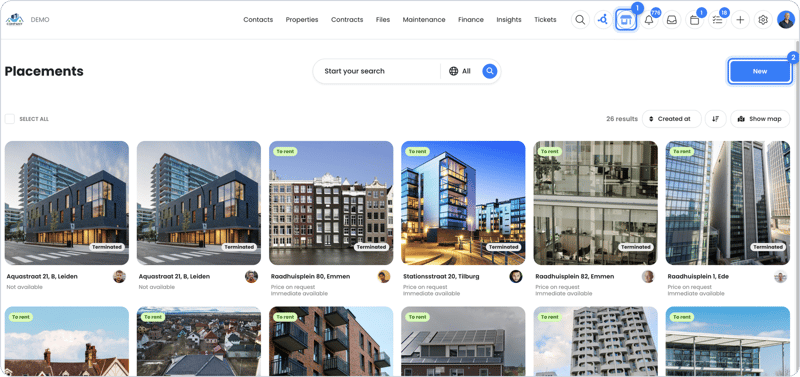
You can find your placements behind the house icon
**The back end (my.owner.app)** is where you handle day-to-day property management: entering units and rental contracts, sending sales invoices, indexing rents, arranging maintenance and communicating with your tenants.
## One account for everything
One OWNER account gives you access everywhere: on the front end, in your real estate environment(s) and in your manager environment. So you can be a tenant and an owner at the same time. From your account on owner.app, the **To manager mode** button takes you to my.owner.app.
The [OWNER app](https://knowledge.owner.app/en/mobile-app?hsLang=en) for iOS and Android is a full version of the front end and back end. You can do everything in it that you can do on your computer.
## Real estate environment and manager environment
| Environment | Who is it for? |
| --- | --- |
| **Real estate environment** | Contains the property: units, rental contracts and sales invoices. A real estate environment can hold property from multiple owners, for example several companies (BVs). |
| **Manager environment** | For property managers. It contains no property, but management contracts. You connect your clients' real estate environments to it. |
Read [What is the difference between a manager environment and a real estate environment?](https://knowledge.owner.app/en/manager-vs-real-estate-environment?hsLang=en) and [How do I switch between environments?](https://knowledge.owner.app/en/switch-between-environments?hsLang=en).
## The my.owner.app menu
The menu is on the left in my.owner.app. This is how it is organized:

The my.owner.app menu
| Menu section | What can you find here? |
| --- | --- |
| **Contacts** | [Companies](https://knowledge.owner.app/en/companies?hsLang=en) and [Persons](https://knowledge.owner.app/en/persons?hsLang=en): tenants, owners, service providers and other contacts. |
| **Properties** | [Units](https://knowledge.owner.app/en/units?hsLang=en), [Installations](https://knowledge.owner.app/en/installations?hsLang=en), [Keys](https://knowledge.owner.app/en/keys?hsLang=en), [Values](https://knowledge.owner.app/en/values?hsLang=en) and [Energy labels](https://knowledge.owner.app/en/energy-labels?hsLang=en). |
| **Contracts** | [Rental contracts](https://knowledge.owner.app/en/rental-contracts?hsLang=en), [Service contracts](https://knowledge.owner.app/en/service-contracts?hsLang=en), [Bookings](https://knowledge.owner.app/en/bookings?hsLang=en), [Indexations](https://knowledge.owner.app/en/indexations?hsLang=en), [Certainties](https://knowledge.owner.app/en/certainties?hsLang=en) (deposits and bank guarantees), [Sales items](https://knowledge.owner.app/en/sales-items?hsLang=en) and [Purchase items](https://knowledge.owner.app/en/purchase-items?hsLang=en). |
| **Files** | [Documents](https://knowledge.owner.app/en/documents?hsLang=en) and [Images](https://knowledge.owner.app/en/images?hsLang=en). |
| **Maintenance** | [Orders](https://knowledge.owner.app/en/orders?hsLang=en) (work orders for service providers) and [Inspections](https://knowledge.owner.app/en/inspections?hsLang=en). |
| **Financial** | [Sales invoices](https://knowledge.owner.app/en/sales-invoices?hsLang=en), [Purchase invoices](https://knowledge.owner.app/en/purchase-invoices?hsLang=en) (expected to be available from January 1, 2027), Payouts and Payments. |
| **Insights** | Rent list, Vacancy list, Journal entries and Turnover per period. Read [Insights](https://knowledge.owner.app/en/insights?hsLang=en). |
| **Tickets** | All conversations with tenants and other contacts. Read [Tickets](https://knowledge.owner.app/en/tickets?hsLang=en). |
| House icon at the top | Your [placements](https://knowledge.owner.app/en/placements?hsLang=en): what you list on the front end. |
| Inbox, calendar and tasks icons at the top | Your inbox, [calendar](https://knowledge.owner.app/en/calendar?hsLang=en) and [tasks](https://knowledge.owner.app/en/tasks?hsLang=en). |
| Bell icon at the top | Your notifications. Read [How do I set up my notifications?](https://knowledge.owner.app/en/set-up-notifications?hsLang=en). |
## Receiving payments
You choose how you receive payments from your tenants:
- **OWNER Wallet** (expected late 2026): a dedicated bank account per owner in OWNER. Read [What is OWNER Wallet?](https://knowledge.owner.app/en/what-is-owner-wallet?hsLang=en).
- **OWNER Pay**: the current integrated payment solution, which is being replaced by OWNER Wallet. Read [Activating OWNER Pay](https://knowledge.owner.app/en/activate-owner-pay?hsLang=en).
- **An accounting integration**: your sales invoices go to your accounting package and the payment status comes back. Read [Which accounting packages can you connect to OWNER?](https://knowledge.owner.app/en/accounting-integrations?hsLang=en).
Not sure? Read [OWNER Wallet or accounting integration: how do you process payments?](https://knowledge.owner.app/en/owner-wallet-or-accounting-integration?hsLang=en).
## Communication and community
All communication runs through your inbox and tickets. An incoming email automatically becomes a ticket, so you can handle everything in one place. Read [How do I connect my inbox?](https://knowledge.owner.app/en/connect-inbox?hsLang=en).
In the free [OWNER Community](https://community.owner.app) you share knowledge with other property owners and property managers, read product updates and vote on new features.
**Tip:** just getting started? Follow the step-by-step plan in [Getting started with OWNER](https://knowledge.owner.app/en/getting-started?hsLang=en).
## Still need help?
Contact support:
- **Chat:** through the [help center](https://owner.app/help?hsLang=en) (chat button at the bottom right)
- **Email:** [support@owner.app](mailto:support@owner.app)
- **Call or WhatsApp:** [+31 591 799 602](tel:+31591799602)
- [Working with OWNER](https://knowledge.owner.app/en/working-with-owner?hsLang=en)
- [Frequently Asked Questions](https://knowledge.owner.app/en/frequently-asked-questions?hsLang=en)
- [Tips](https://knowledge.owner.app/en/tips?hsLang=en)
- [Connections](https://knowledge.owner.app/en/connections?hsLang=en)
[](https://knowledge.owner.app/nl?hsLang=en)
Raadhuisplein 82, 7811 AP Emmen, Nederland
[mailto:support@owner.app](mailto:support@owner.app)
Copyright © 2025, OWNER