---
title: Getting started with OWNER
description: "Step-by-step plan for new users: owner, unit, rental contract, sales items, invoicing, payments and subscription, plus a checklist."
---
[Skip to content](https://knowledge.owner.app/en/getting-started#main-content)
- [English](https://knowledge.owner.app/en/getting-started)
- [Deutsch](https://knowledge.owner.app/de/erste-schritte)
- [Español](https://knowledge.owner.app/es/primeros-pasos)
- [Français](https://knowledge.owner.app/fr/bien-demarrer)
- [Nederlands](https://knowledge.owner.app/nl/aan-de-slag)
English
Show submenu for translations
[More support](https://knowledge.owner.app/en/kb-tickets/new?hsLang=en)
[](https://knowledge.owner.app/en/?hsLang=en)
Open main navigation
Close main navigation
- - [English](https://knowledge.owner.app/en/getting-started)
- [Deutsch](https://knowledge.owner.app/de/erste-schritte)
- [Español](https://knowledge.owner.app/es/primeros-pasos)
- [Français](https://knowledge.owner.app/fr/bien-demarrer)
- [Nederlands](https://knowledge.owner.app/nl/aan-de-slag)
English
Show submenu for translations
- [More support](https://knowledge.owner.app/en/kb-tickets/new)
- [Back to environment](http://my.owner.app/)
[Back to environment](http://my.owner.app/)
Knowledge bank for owners
- There are no suggestions because the search field is empty.
1. [Knowledge base](https://knowledge.owner.app/en?hsLang=en)
2. [Working with OWNER](https://knowledge.owner.app/en/working-with-owner?hsLang=en)
October 20, 2026
# Getting started with OWNER
## Seven steps from a new environment to your first sales invoice.
New to OWNER? With these steps you set up your environment and get your first sales invoice ready. You don't have to do everything at once.
**In this article**
1. [How to start](https://knowledge.owner.app/en/getting-started#zo-begin-je)
2. [Step-by-step plan](https://knowledge.owner.app/en/getting-started#stappenplan)
3. [Checklist for your first sales invoices](https://knowledge.owner.app/en/getting-started#checklist)
## How to start
When you create a new environment, OWNER takes you through a short onboarding. It guides you through the most important steps, with the goal of having a first sales invoice ready at the end. You can also follow the steps yourself, in this order:
| Step | What do you do? |
| --- | --- |
| 1 | Add an owner |
| 2 | Add a unit |
| 3 | Create a rental contract |
| 4 | Check the sales items |
| 5 | Set up invoicing |
| 6 | Choose how you receive payments |
| 7 | Activate your subscription |
No environment yet? Create one for free at [owner.app/environment/setup](https://owner.app/environment/setup?hsLang=en).
## Step-by-step plan
### Step 1 – Add an owner
The owner is the legal party (a company or a private individual) on whose behalf the sales invoices are sent.
1. Go to **Settings \> Environment settings \> Owners** and add an owner.
2. Fill in the details and upload a logo. You set the logo and details for the sales invoice, the indexation letter and the inspection.
3. Using an accounting integration? Then enter your own IBAN. With OWNER Wallet (expected late 2026), every owner automatically gets a bank account in OWNER.
You also set up the numbering of your sales invoices per owner. Read [Invoice numbering](https://knowledge.owner.app/en/invoice-numbering?hsLang=en).

You add an owner under Settings \> Environment settings \> Owners
### Step 2 – Add a unit
1. Go to **Properties \> Units** and add a unit.
2. Check the address: it appears on the sales invoice.
Read [Units](https://knowledge.owner.app/en/units?hsLang=en).
### Step 3 – Create a rental contract
1. Go to **Contracts \> Rental contracts** and create a new rental contract.
2. Choose the unit and add the tenant. If the tenant doesn't exist yet, you can create them directly from the rental contract as a person or as a company.
3. Fill in the start date, the invoicing interval (the invoicing period) and, if applicable, the indexation. Read [Invoicing periods](https://knowledge.owner.app/en/invoicing-periods?hsLang=en).
Read [Rental contracts](https://knowledge.owner.app/en/rental-contracts?hsLang=en).

Create the tenant directly from the rental contract
### Step 4 – Check the sales items
A sales item is a line on the sales invoice, such as rent or service charges. You link sales items to a rental contract with an amount per invoicing period. You manage them under **Contracts \> Sales items**. Read [Sales items](https://knowledge.owner.app/en/sales-items?hsLang=en).
### Step 5 – Set up invoicing
Go to **Settings \> Modules \> Contracts \> Rental contracts** and choose an option for **Automatically bill and index?**:
- **On**: sales invoices and indexations go out automatically, as many days before the due date as you set under **How many days before the due date?**.
- **Off**: sales invoices are prepared automatically, but wait for your approval.
Either way, you can see upcoming sales invoices under **Financial \> Sales invoices** on the **Planned** tab. Read [Automatic invoicing](https://knowledge.owner.app/en/automatic-invoicing?hsLang=en).
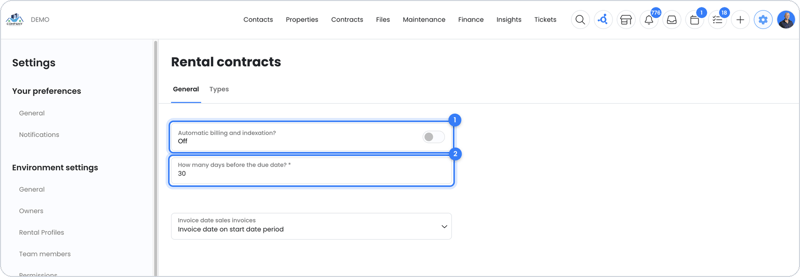
Choose whether sales invoices go out automatically or wait for approval first
### Step 6 – Choose how you receive payments
Do you receive payments through OWNER Pay (soon OWNER Wallet, expected late 2026) or through an accounting integration? Read [OWNER Wallet or accounting integration](https://knowledge.owner.app/en/owner-wallet-or-accounting-integration?hsLang=en) and [Activating OWNER Pay](https://knowledge.owner.app/en/activate-owner-pay?hsLang=en).
**Note:** you can complete the verification of your details (KYC) for OWNER Pay later. Until you have done so, the sales invoice shows that you can't send it yet.
### Step 7 – Activate your subscription
Getting started is free. Only activate your subscription when you want to send sales invoices. Read [Subscription and credits](https://knowledge.owner.app/en/subscription-and-credits?hsLang=en).
## Checklist for your first sales invoices
Go through this list before you send your first sales invoices:
| Item | Check |
| --- | --- |
| **Owners** | Logo uploaded, address and contact details correct, bank account number (IBAN) correct. These details appear on the sales invoice. |
| **Units** | Addresses correct: they appear on the sales invoice. |
| **Persons and companies** | Address details correct and the language set correctly for each person. Read [In which language does someone receive documents?](https://knowledge.owner.app/en/document-language?hsLang=en). |
| **Rental contracts** | Start and end dates are correct. The invoicing start date is set so that you don't double-invoice periods you already invoiced in another system (read [What is Invoiced until?](https://knowledge.owner.app/en/invoiced-until?hsLang=en)). The recipients of sales invoices and indexations are correct. |
| **Sales items** | Amounts match the invoicing period: if the rental contract invoices monthly, enter monthly amounts; if quarterly, quarterly amounts. |
| **Indexation** | Indexation is turned on where needed, with the right method and date, and the right sales items are marked for indexation. Without sales items to index, no indexation takes place. |
| **Sales invoices** | Review the sales invoices under Financial \> Sales invoices \> Planned tab before they are sent. |
## Still need help?
Contact support:
- **Chat:** through the [help center](https://owner.app/help?hsLang=en) (chat button at the bottom right)
- **Email:** [support@owner.app](mailto:support@owner.app)
- **Call or WhatsApp:** [+31 591 799 602](tel:+31591799602)
- [Working with OWNER](https://knowledge.owner.app/en/working-with-owner?hsLang=en)
- [Frequently Asked Questions](https://knowledge.owner.app/en/frequently-asked-questions?hsLang=en)
- [Tips](https://knowledge.owner.app/en/tips?hsLang=en)
- [Connections](https://knowledge.owner.app/en/connections?hsLang=en)
[](https://knowledge.owner.app/nl?hsLang=en)
Raadhuisplein 82, 7811 AP Emmen, Nederland
[mailto:support@owner.app](mailto:support@owner.app)
Copyright © 2025, OWNER