---
title: How does automatic invoicing work?
description: "Automatic invoicing in OWNER on or off: when sales invoices and indexations are sent or prepared, and how you can still step in."
---
[Skip to content](https://knowledge.owner.app/en/automatic-invoicing#main-content)
- [English](https://knowledge.owner.app/en/automatic-invoicing)
- [Deutsch](https://knowledge.owner.app/de/automatische-rechnungsstellung)
- [Español](https://knowledge.owner.app/es/facturacion-automatica)
- [Français](https://knowledge.owner.app/fr/facturation-automatique)
- [Nederlands](https://knowledge.owner.app/nl/automatisch-factureren)
English
Show submenu for translations
[More support](https://knowledge.owner.app/en/kb-tickets/new?hsLang=en)
[](https://knowledge.owner.app/en/?hsLang=en)
Open main navigation
Close main navigation
- - [English](https://knowledge.owner.app/en/automatic-invoicing)
- [Deutsch](https://knowledge.owner.app/de/automatische-rechnungsstellung)
- [Español](https://knowledge.owner.app/es/facturacion-automatica)
- [Français](https://knowledge.owner.app/fr/facturation-automatique)
- [Nederlands](https://knowledge.owner.app/nl/automatisch-factureren)
English
Show submenu for translations
- [More support](https://knowledge.owner.app/en/kb-tickets/new)
- [Back to environment](http://my.owner.app/)
[Back to environment](http://my.owner.app/)
Knowledge bank for owners
- There are no suggestions because the search field is empty.
1. [Knowledge base](https://knowledge.owner.app/en?hsLang=en)
2. [Frequently Asked Questions](https://knowledge.owner.app/en/frequently-asked-questions?hsLang=en)
October 20, 2026
# How does automatic invoicing work?
## Choose whether OWNER sends your sales invoices and indexations automatically or prepares them for approval first.
OWNER always creates the sales invoices for your rental contracts automatically. With the automatic invoicing setting, you decide whether they are also sent automatically, or wait for your approval first.
**In this article**
1. [Where do you set it up?](https://knowledge.owner.app/en/automatic-invoicing#waar-stel-je-het-in)
2. [The difference between on and off](https://knowledge.owner.app/en/automatic-invoicing#aan-of-uit)
3. [Automatic invoicing is on](https://knowledge.owner.app/en/automatic-invoicing#automatisch-aan)
4. [Automatic invoicing is off](https://knowledge.owner.app/en/automatic-invoicing#automatisch-uit)
5. [Frequently asked questions](https://knowledge.owner.app/en/automatic-invoicing#veelgestelde-vragen)
## Where do you set it up?
Go to **Settings** \> **Modules** \> **Contracts** \> **Rental contracts**, **General** tab.
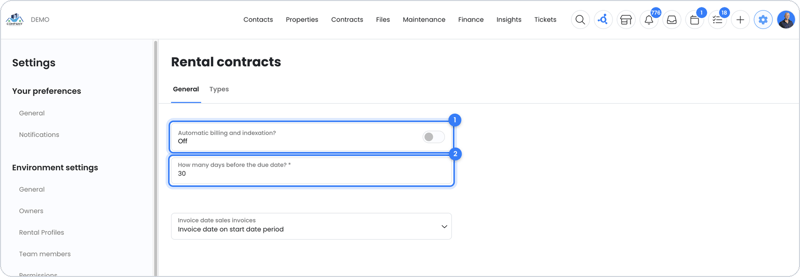
This is where you turn automatic invoicing on or off and choose the number of days.
| Field | What does it do? |
| --- | --- |
| **Automatically bill and index?** | On: sales invoices and indexations go out automatically. Off: they are prepared and wait for your approval. |
| **How many days before the due date?** | How many days before the due date OWNER sends (on) or prepares (off) the sales invoices. For example, 20 days. |
| **Invoice date sales invoices** | Drop-down list with **Invoice date on send date** or **Invoice date on start date period**. Determines which invoice date is put on the automatically created sales invoices. |
## The difference between on and off
| | Automatic invoicing ON | Automatic invoicing OFF |
| --- | --- | --- |
| **What happens X days before the due date?** | Indexations and sales invoices go out automatically, without approval. | The planned sales invoices are made ready under **Planned** and wait for you. |
| **What do you need to do?** | Nothing. You can still step in as long as the sales invoice is under Planned. | Accept the planned sales invoice (it becomes a draft), then accept the draft (it becomes final). |
| **Indexations** | The indexation happens first, and the invoicing a few seconds later. Indexations are always planned, even if the index figure isn't known yet. | You decide when to index. Indexations are only prepared once the index figure is known. |
## Automatic invoicing is on
Say you've set 20 days. Then the sales invoices and indexations go out automatically 20 days before the due date. The indexation happens first, and the invoicing a few seconds later, so the sales invoice immediately includes the new rent.
Under **Financial** \> **Sales invoices** \> **Planned**, you always see the planned sales invoices for the next period, with the date on which they will be sent. Is something not right? Then you can still step in before they go out, for example by changing the rental contract or the sales items.

Under Planned you can see when each sales invoice will be sent.
## Automatic invoicing is off
OWNER still creates the sales invoices automatically, but doesn't send them itself. They are ready the set number of days in advance:
1. Go to **Financial** \> **Sales invoices** \> **Planned**.
2. Check the planned sales invoice and accept it. It is now under **Concept** (drafts).
3. Edit the draft if needed and accept it. The sales invoice is now final and is sent through the chosen sending method.
In this case, you decide on indexations yourself. They are only prepared once the index figure is known. Read more in [Why isn't my indexation ready?](https://knowledge.owner.app/en/indexation-not-ready?hsLang=en)
## Frequently asked questions
#### Does the setting apply to all my rental contracts?
Yes. You set the number of days once for the whole environment. A separate term per indexation method is not possible (yet).
#### I don't see a planned sales invoice. Why is that?
It's usually because of the data in the rental contract. Go through [Why isn't my sales invoice ready?](https://knowledge.owner.app/en/sales-invoice-not-ready?hsLang=en)
#### Can I deviate from a scheduled indexation?
Yes, see [Can I deviate from a scheduled indexation?](https://knowledge.owner.app/en/deviate-from-scheduled-indexation?hsLang=en)
## Still need help?
Contact support:
- **Chat:** through the [help center](https://owner.app/help?hsLang=en) (chat button at the bottom right)
- **Email:** [support@owner.app](mailto:support@owner.app)
- **Call or WhatsApp:** [+31 591 799 602](tel:+31591799602)
- [Working with OWNER](https://knowledge.owner.app/en/working-with-owner?hsLang=en)
- [Frequently Asked Questions](https://knowledge.owner.app/en/frequently-asked-questions?hsLang=en)
- [Tips](https://knowledge.owner.app/en/tips?hsLang=en)
- [Connections](https://knowledge.owner.app/en/connections?hsLang=en)
[](https://knowledge.owner.app/nl?hsLang=en)
Raadhuisplein 82, 7811 AP Emmen, Nederland
[mailto:support@owner.app](mailto:support@owner.app)
Copyright © 2025, OWNER